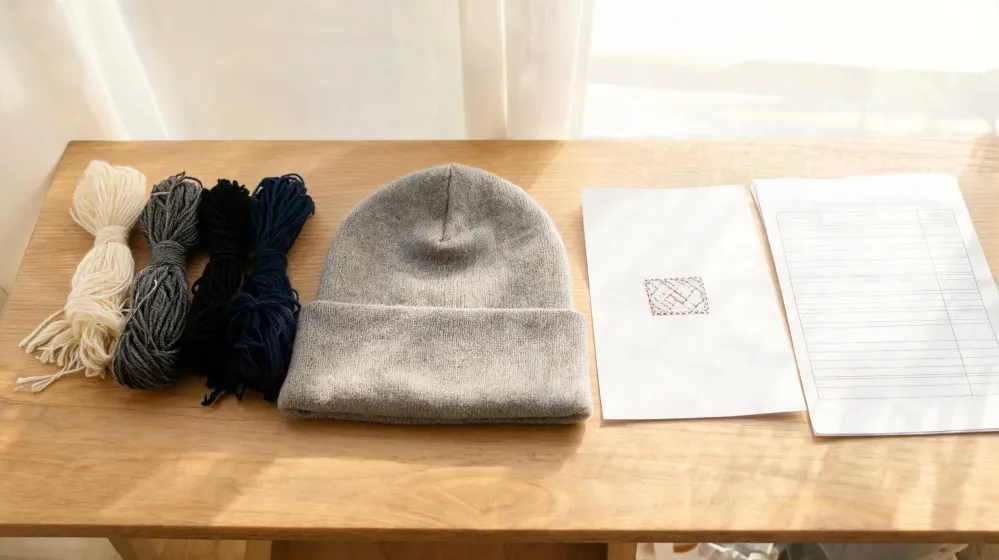
I would not release a custom beanie run on a mockup image alone. The cuff is its own decoration zone, and stitch direction across a ribbed band can go wrong while the front-panel artwork still looks right, so what I sign has to be a digitized preview tied to a cuff sample I can measure. One condition would break that verdict: a supplier who digitizes before the order is placed and hands over a cuff-positioned stitch sample with marked start and end points makes the extra approval loop pointless, and I would sign the mockup and move on.
That condition is not in front of me. I hold no quote, sample record or production commitment from a candidate supplier for this beanie program, so everything below is the approval sequence I would put into an RFQ and check at sample stage, not a report of a run I have signed off.
Why the Cuff Approval Comes Before the Artwork
Custom Ink's hat design guide treats the cuff as a named embroidery zone: knit caps can be embroidered with a logo or design on the cuff. That line changes the order of my approval steps. A cuff is not a smaller front panel; it is a band with its own stretch direction, and a logo that reads correctly on a flat crown can twist or run uphill once it is stitched onto that band. Two things get locked before anyone touches artwork: where the stitching starts and stops along the band, and which way the stitches run relative to the rib. Either can fail while the artwork file itself is fine.
The boundary matters. That guide describes one vendor's service and the hat styles it offers. It is a process document, not a statement about what any factory can hold. I use it to justify splitting cuff placement from front-panel artwork, not to assume a supplier's capability before the supplier answers.
Your Mockup Does Not Show Cuff Stitching
The image I would otherwise approve is generated from the design file, and that file is digitized only after the order is placed. Printful's graphics and embroidery guide states both steps plainly: the Mockup Generator uses your design file to create the image, and your file is digitized after you place an order. Read those two in sequence and the gap is hard to miss, because the picture on the screen exists before any stitch instruction does.
The same guide describes when an approval sheet shows up: if your design needs adjustments, you receive an Approval Sheet with a digitization preview. That is the document worth having, and it is conditional. A design that passes without adjustment may produce no preview at all, which is the case where I want one anyway, since 'no adjustments needed' is a statement about the artwork, not about how that artwork lands on a rib band.
Both statements come from one vendor's graphics workflow on its stored US pages. They tell me what a digitization step is supposed to produce for that vendor. They do not tell me what my supplier will produce, and I do not read them as a capability claim.
How I Compare Two Vendor Approval Flows
Both documents describe a logo that ends up as thread on a cuff, but compared with a design-placement guide that only fixes where the artwork sits on the knit cap, the digitization flow inserts an approval sheet between the file and the bulk run, and unlike a mockup review that happens before anything is digitized, that sheet carries a preview of the actual stitch pattern that I can read for direction and coverage, though it only arrives when the design needs adjustment.
Only one of them hands me a pre-production checkpoint.
I read the two side by side and get different answers to the same question. The placement guide answers where the logo goes. The digitization flow answers how it will be stitched, and it answers later in the order. Neither gives me a stitch count, a density figure or a rule for how the file behaves across the size run, so the comparison tells me what to demand in writing rather than what I will receive.
The Cuff Sample Test I Would Run
Suppose I take one logo file and split it into two cuff samples: one released after a signed digitization preview, one released on the mockup alone. On arrival I would lay each cuff flat, mark a baseline along the band from the seam, and check two things: where the first and last stitch land relative to the rib break, and whether the stitch direction runs with the cuff's stretch or against it. The pass condition is blunt. If a start or end point falls outside the marked cuff zone, the sample goes back for re-digitizing and the run does not release.
I am describing a plan, not a result. No sample has been produced, stitched or measured here. The two-sample split is simply a way to see whether a preview actually predicts what the needle does once it reaches the band.
What Would Make Me Drop the Pre-Approval Rule
The rule earns its keep only under specific conditions. If a supplier digitizes after the order is placed and will not share a stitch file before bulk starts, there is nothing to sign, and the loop becomes a delay with no decision inside it. If the cuff is a folded or seamed band whose stitchable area a flat preview cannot represent, a preview signed on screen proves less than a hand-marked sample. If the run is a very small order, the sample loop can cost more schedule time than the rework it prevents.
None of those conditions can be closed from this page. No quote, MOQ, capacity review, lead time commitment or certification from a candidate supplier has been captured, and no physical sample or third-party test exists, so the answer for a specific factory stays open until that factory fills it in.
RFQ Questions That Keep the Cuff Checkable
Put the check into the RFQ so it is answered before pricing is final. Ask which file triggers digitization and at what point in the order it happens. Ask for the approval sheet with the digitization preview before bulk, and ask what the flow becomes when your design needs no adjustment. Ask where the stitch start and end points sit relative to the cuff band and the seam. Ask whether one preview covers the whole size run or whether the band changes with size. Ask which stitch-file format they hand over and whether that file stays with your account.
These are questions, not requirements I can attribute to a factory. Each answer has to come from the candidate, in writing, on the quotation you will compare against the others.
The Cost of One Extra Approval Loop
The loop costs one file-exchange round before bulk. A reversed stitch direction or a cuff logo sitting off-center costs the run. That trade is not close when the cuff placement is new, with a new band, new size and new logo scale, and it narrows when the same cuff file already passed on an earlier run, because the sample has done the work and a second preview adds a signature instead of information. I keep the loop for anything new and drop to a single sample sign-off for a repeat.
Back to the sample on the bench, waiting for a signature. It gets mine when the digitized preview and the measured cuff agree on where the stitching starts, where it stops and which way it runs against the rib; if they disagree it goes back for re-digitizing and nothing ships. No candidate supplier has answered yet, so that signature stays conditional, and the mockup image alone still does not get it.
